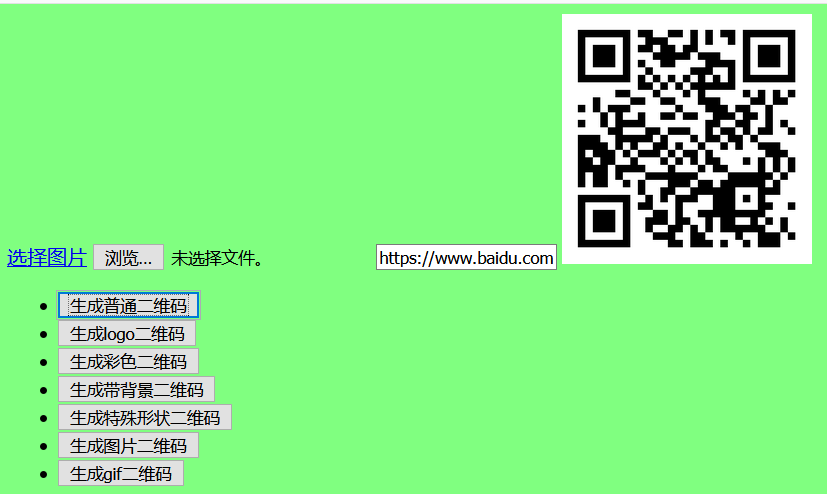
一、关于扫一扫二维码登录?关于支付端的二维码?关于扫二维码添加好友?
理解:无论是何种功能的二维码,它都是基于生成该二维码的请求,列如:扫码登录对应一个扫码后登录的Api、扫码支付对应支付的Api、扫码加好友对应加好友的Api。
//引入谷歌提供的二维码依赖
<dependency>
    <groupId>com.google.zxing</groupId>
    <artifactId>core</artifactId>
    <version>3.3.0</version>
</dependency>
<dependency>
    <groupId>com.google.zxing</groupId>
    <artifactId>javase</artifactId>
    <version>3.3.0</version>
</dependency>
<dependency>
    <groupId>commons-codec</groupId>
    <artifactId>commons-codec</artifactId>
    <version>1.10</version>
</dependency>二、关于生成几种常见样式的二维码?
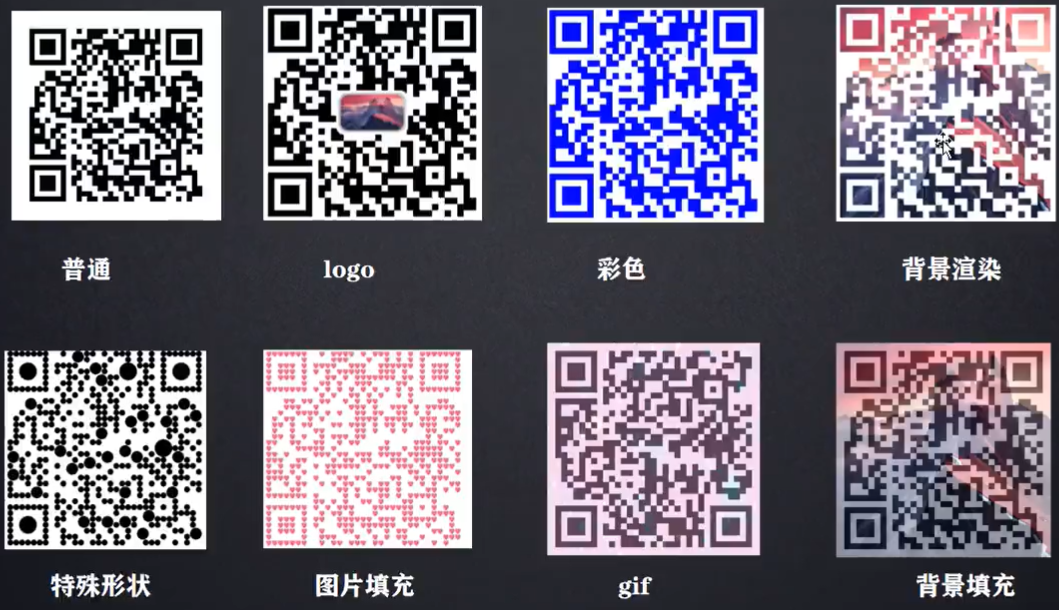
市面上生成二维码的技术:
1、google:zxing(主流的,但只能生成黑白相间(普通和logo)的二维码)
2、github:qrcode(基于zxing,可生成绚丽多彩的二维码,如下:)
三、实现:QrCodeController、ZxingUtil、QrCodeUtil、index.html
   //构建生成二维码项目所需依赖
	<parent>
        <groupId>org.springframework.boot</groupId>
        <artifactId>spring-boot-starter-parent</artifactId>
        <version>2.4.0</version>
    </parent>
    <dependencies>
        <dependency>
            <groupId>org.springframework.boot</groupId>
            <artifactId>spring-boot-starter-web</artifactId>
        </dependency>
        <dependency>
            <groupId>org.springframework.boot</groupId>
            <artifactId>spring-boot-autoconfigure</artifactId>
        </dependency>
<!--        google:zxing-->
        <dependency>
            <groupId>com.google.zxing</groupId>
            <artifactId>core</artifactId>
            <version>3.3.0</version>
        </dependency>
        <dependency>
            <groupId>com.google.zxing</groupId>
            <artifactId>javase</artifactId>
            <version>3.3.0</version>
        </dependency>
<!--        github:qrCode-->
        <dependency>
            <groupId>com.github.liuyueyi.media</groupId>
            <artifactId>qrcode-plugin</artifactId>
            <version>2.5.2</version>
        </dependency>
        <dependency>
            <groupId>commons-lang</groupId>
            <artifactId>commons-lang</artifactId>
            <version>2.6</version>
        </dependency>
    </dependencies>
//静态资源下的:index.html
<!DOCTYPE html>
<html lang="en">
<head>
<meta charset="UTF-8">
<script language="JavaScript" src="jquery-3.5.1.js"></script>
<title>单文件上传</title>
</head>
<style>
img[src=""].img:not([src]){
opacity: 0;
}
</style>
<body>
<a href="javascript:void(0)" onclick="uploadPhoto()">选择图片</a>
<input type="file" id="photoFile">
<input type="text" id="text" placeholder="请输入跳转链接">
<img id="preview_photo" src="" width="200px" height="200px">
<ul>
<li><input type="button" id="normal" value="生成普通二维码" onclick="upload('normal')"></li>
<li><input type="button" id="logo" value="生成logo二维码" onclick="upload('logo')"></li>
<li><input type="button" id="color" value="生成彩色二维码" onclick="upload('color')"></li>
<li><input type="button" id="background" value="生成带背景二维码" onclick="upload('background')"></li>
<li><input type="button" id="style" value="生成特殊形状二维码" onclick="upload('style')"></li>
<li><input type="button" id="imageFile" value="生成图片二维码" onclick="upload('imageFile')"></li>
<li><input type="button" id="gif" value="生成gif二维码" onclick="upload('gif')"></li>
</ul>
</body>
<script>
function uploadPhoto() {
$('#photoFile').click();
}
/**
* 上传图片
* @param flag
*/
function upload(flag) {
let formData = new FormData();
formData.append('logoFile',document.getElementById('photoFile').files[0]);
formData.append('text',document.getElementById('text').value);
formData.append('flag',flag);
$.ajax({
url:"http://localhost:8080/create",
type:"post",
data:formData,
contentType:false,
processData: false,
success:function (data) {
$('#preview_photo').attr("src","data:image/jpeg;base64,"+data)
},
error:function (data) {
alert("上传失败")
}
})
}
</script>
</html>//用于返回 生成二维码的base64字符串格式图片
/**
* 基于Zxing jar包生成普通和logo二维码
* @Author:LuJiaHong
* @Date:2021/1/27~3:55:57
* @Version 1.0
*/
public class ZxingUtil {
public static String createImage(String text, InputStream imgPath) throws Exception{
HashMap map = new HashMap();
map.put(EncodeHintType.ERROR_CORRECTION, ErrorCorrectionLevel.H);//纠错程度
map.put(EncodeHintType.CHARACTER_SET,"utf-8");//字符编码
map.put(EncodeHintType.MARGIN,1);//边距
BitMatrix bitMatrix = new MultiFormatWriter().encode(text, BarcodeFormat.QR_CODE,300,300,map);
int width = bitMatrix.getWidth();
int height = bitMatrix.getHeight();
BufferedImage image = new BufferedImage(width,height,BufferedImage.TYPE_INT_RGB);
for(int x = 0 ; x < width ; x++){
for(int y = 0; y < height ; y++){
image.setRGB(x,y,bitMatrix.get(x,y) ? 0xFF000000 : 0xFFFFFF);
}
}
if(imgPath == null){
return imageToBase64(image);
}
image = insertLogo(image,imgPath);
return imageToBase64(image);
}
/**
* 生成logo二维码
* @param image
* @param imgPath
* @return
* @throws Exception
*/
private static BufferedImage insertLogo(BufferedImage image, InputStream imgPath) throws Exception{
Image logo = ImageIO.read(imgPath);
int w = logo.getWidth(null);
int h = logo.getHeight(null);
if(w>100){
w=100;
}
if(h>100){
h=100;
}
Image logo1 = logo.getScaledInstance(w,h,Image.SCALE_SMOOTH);
BufferedImage bfImage = new BufferedImage(w,h,BufferedImage.TYPE_INT_RGB);
Graphics g = bfImage.getGraphics();
g.drawImage(logo1,0,0,null);
g.dispose();
Graphics2D gra = image.createGraphics();
int x = (300-w)/2;
int y = (300-h)/2;
gra.drawImage(logo1,x,y,null);
Shape shape = new RoundRectangle2D.Double(x,y,w,h,6,6);//设置圆角
gra.setStroke(new BasicStroke(3f));//设置画笔粗细
gra.draw(shape);
gra.dispose();//释放资源
return image;
}
/**
* 图片转为base64格式
* @param image
* @return
* @throws Exception
*/
public static String imageToBase64(BufferedImage image) throws Exception{
ByteArrayOutputStream os = new ByteArrayOutputStream();
ImageIO.write(image,"png",os);
return Base64.encodeBase64String(os.toByteArray());
}/**
* 基于gitHub上开源的QrCode jar包生成各种类型二维码
* @Author:LuJiaHong
* @Date:2021/1/31~23:32:22
* @Version 1.0
*/
public class QrCodeUtil {
/**
* 普通二维码
* @param text
* @return
* @throws Exception
*/
public static String normal(String text) throws Exception {
return QrCodeGenWrapper.of(text).asString();
}
/**
* logo二维码
* @param text
* @param logoFile
* @return
* @throws Exception
*/
public static String logo(String text, InputStream logoFile) throws Exception {
return QrCodeGenWrapper
.of(text)
.setLogo(logoFile)
.setLogoRate(7)
.setLogoStyle(QrCodeOptions.LogoStyle.ROUND)
.asString();
}
/**
* 带颜色二维码
* @param text
* @return
* @throws Exception
*/
public static String color(String text) throws Exception {
return QrCodeGenWrapper
.of(text)
.setDrawBgColor(Color.red)
.asString();
}
/**
* 带背景图标二维码
* @param text
* @param bgFile
* @return
* @throws Exception
*/
public static String backGround(String text, InputStream bgFile) throws Exception {
return QrCodeGenWrapper
.of(text)
.setBgImg(bgFile)
// .setBgStyle(QrCodeOptions.BgImgStyle.FILL)//填充模式
.setBgStyle(QrCodeOptions.BgImgStyle.PENETRATE)//渲染模式
.setBgH(500)
.setBgW(500)
.setW(500)
.setH(500)
// .setBgStartX(130)
// .setBgStartY(130)
// .setBgOpacity(0.5f)
.asString();
}
/**
* 特殊形状二维码
* @param text
* @return
* @throws Exception
*/
public static String style(String text) throws Exception {
return QrCodeGenWrapper
.of(text)
.setBgH(500)
.setBgW(500)
.setW(500)
.setH(500)
.setDrawEnableScale(true)
.setDrawStyle(QrCodeOptions.DrawStyle.CIRCLE)
.asString();
}
/**
* 生成图片二维码
* @param text
* @param bgFile
* @return
* @throws Exception
*/
public static String imageFile(String text, InputStream bgFile) throws Exception {
return QrCodeGenWrapper
.of(text)
.setW(500)
.setH(500)
.setDrawEnableScale(true)
.setErrorCorrection(ErrorCorrectionLevel.H)
.setDrawStyle(QrCodeOptions.DrawStyle.IMAGE)
.addImg(1,1,bgFile)
.asString();
}
/**
* 生成gif二维码
* @param text
* @param bgFile
* @return
* @throws Exception
*/
public static String gif(String text, InputStream bgFile) throws Exception {
return QrCodeGenWrapper
.of(text)
.setW(500)
.setH(500)
.setBgImg(bgFile)
.setBgOpacity(0.5f)
.setPicType("gif")
.asString();
}
}
//供异步请求获取 生成的Base64二维码图片 控制层
@RestController
public class QrCodeController {
    @RequestMapping("/create")
    public String CreateQrCode(@RequestParam(value = "logoFile",required = false)MultipartFile file,
                               @RequestParam(value = "text")String text,
                               @RequestParam(value = "flag")String flag){
        try {
            if(file != null){
                if("logo".equals(flag)) {
//return ZxingUtil.createImage(text,file.getInputStream());
                    return QrCodeUtil.logo(text,file.getInputStream());
                }else if ("background".equals(flag)){
                    return QrCodeUtil.backGround(text,file.getInputStream());
                }else if ("imageFile".equals(flag)){
                    return QrCodeUtil.imageFile(text,file.getInputStream());
                }else if ("gif".equals(flag)){
                    return QrCodeUtil.gif(text,file.getInputStream());
                }
            }else{
                if("normal".equals(flag)) {
//                return ZxingUtil.createImage(text,null);
                    return QrCodeUtil.normal(text);
                }else if ("color".equals(flag)){
                    return QrCodeUtil.color(text);
                }else if ("style".equals(flag)){
                    return QrCodeUtil.style(text);
                }
            }
        } catch (Exception e) {
            e.printStackTrace();
        }
        return "hello";
    }
}
四、说明
按给定的跳转链接(字段)和背景图片,生成的指定样式二维码,微信扫码即可实现链接的跳转(获取字段)